If you write in British or Australian English, you’ve probably run into this annoyance: Microsoft Word happily accepts both ‑ise and ‑ize spellings — organise/organize, recognise/recognize, finalise/finalize — even though many writers, editors, universities, and publishers insist on ‑ise only.
Word doesn’t offer a built‑in setting to enforce this preference. But the good news is: you can force Word to flag every ‑ize spelling as an error.
All it takes is a small tweak to Word’s exclusion dictionary.
This guide shows you exactly how.
What is an exclusion dictionary?
Word has two kinds of dictionaries:
- Main dictionary — contains all valid spellings
- Exclusion dictionary — tells Word:
“This word exists, but treat it as wrong.”
We’ll use the exclusion dictionary to ban ‑ize spellings so Word marks them with a red underline.
Step 1 — Open Word’s proofing folder
On Windows, press:
Windows key + R
Then paste:
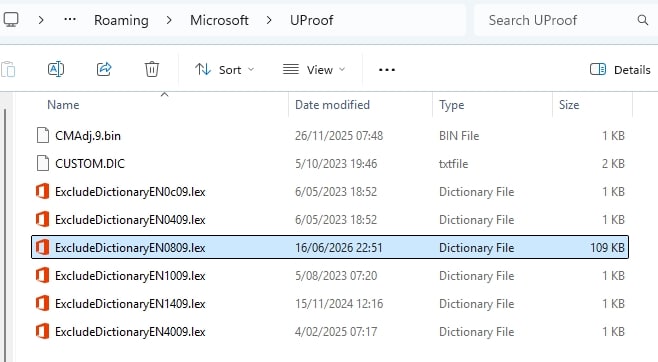
%AppData%\Microsoft\UProof
Step 2 — Find the UK dictionary file
Even if you use English (Australia), Word relies on the UK dictionary for spelling rules.
Look for:
ExcludeDictionaryEN0809.lex
If it doesn’t exist, create it:
- Right‑click → New → Text Document
- Name it: ExcludeDictionaryEN0809.lex
Step 3 — Add the spellings you want to ban
Open the file in Notepad.
Add each unwanted spelling one per line, for example:
organize
organizing
organization
recognize
recognizing
realize
realizing
Save the file.
You can add hundreds or thousands of entries — Word handles it fine.
(If you want a complete A–Z exclusion list, including all inflections and hyphenated forms, you can ask an LLM to generate the list for you – it is too large for me to paste here.)
Step 4 — Restart Word
Close Word completely and reopen it.
Now type:
“We will organize the meeting.”
Word will underline organize as a spelling error.
Type:
“We will organise the meeting.”
No red underline.
Success.
Why this method works
Word’s built‑in UK/AU dictionaries treat both ‑ise and ‑ize as correct. The exclusion dictionary overrides that by telling Word:
- “These specific words are not acceptable.”
- “Flag them as errors even if they exist in the main dictionary.”
It’s the same mechanism publishers use to enforce house style.